If your thermostat is blank, the most likely explanation is simple: the thermostat has lost power. The harder question is where that power was lost. On one home, the fix may be fresh batteries. On another, the blank screen may point to the furnace, air handler, condensate safety switch, low-voltage fuse, transformer, wiring, or the thermostat itself, observes Impact Realty Property Management.
This guide walks through the safe checks first, then explains when the problem has moved beyond a homeowner-level fix. The goal is not to turn you into an HVAC technician. It is to help you avoid an unnecessary thermostat replacement, spot obvious safety clues, and know what to tell a professional if the screen stays dark.
A blank thermostat screen usually means a power problem, but the power source can be batteries or the HVAC control circuit.
Quick Answer: A Blank Thermostat Usually Means It Lost Power
A blank thermostat screen usually means the thermostat is not getting display power. If your thermostat uses batteries, start with fresh batteries and clean contacts. If it is hardwired, the thermostat may have lost low-voltage control power from the furnace or air handler. That upstream loss can happen when a breaker trips, a service switch is off, a furnace door switch is open, a condensate float switch shuts the system down, a low-voltage fuse blows, a transformer fails, wiring shorts, or the thermostat fails.
ENERGY STAR describes a smart thermostat as a Wi-Fi enabled device that controls heating and cooling temperature settings, and it notes that compatibility with your heating and cooling system matters when buying one.[1] That compatibility point matters during troubleshooting too. A smart thermostat, a basic battery thermostat, and a hardwired thermostat can all go blank for different reasons.
First, Decide Which Type of Thermostat You Have
The fastest way to understand a blank thermostat is to identify how it normally gets power. A wall thermostat may look like a small independent device, but in many homes it is part of a larger control circuit tied to the indoor HVAC equipment. That is why replacing the visible wall unit does not always solve a blank screen.
Battery-powered thermostats
A battery-powered thermostat uses batteries to run the display and switching functions. If those batteries die, are installed backward, leak, or do not touch the contacts firmly, the screen can go dark. This is the easiest path to check because you can replace the batteries without opening the furnace cabinet or touching wires.
Use the battery type listed on the thermostat or inside the battery compartment. After replacing the batteries, wait a minute for the display to reboot. If the screen comes back but the equipment does not respond, do not stop troubleshooting. Some thermostats can display information from batteries while still needing the HVAC control circuit to operate heating or cooling.
Hardwired thermostats
A hardwired thermostat usually receives low-voltage power from the furnace, air handler, or boiler controls. In many conventional forced-air systems, the thermostat uses the R terminal and, for continuous power, the C or common terminal. Resideo’s Honeywell Home C-wire adapter product describes the common wire as a way to power connected thermostats that require a C-wire.[2]
If a hardwired thermostat goes blank, the wall device may be innocent. The indoor unit may have stopped supplying control power because of an open panel switch, a tripped breaker, a safety switch, a low-voltage fuse, a bad transformer, or a wiring fault.
Hybrid thermostats can be confusing
Some thermostats accept batteries even though they also connect to HVAC control wires. That creates a common trap: the display may turn on after you add batteries, but the heating or cooling still will not run. In that case, the batteries proved only that the display can wake up. They did not prove that the indoor HVAC equipment is sending usable control power.
“Thermostat blank. Thermostat hardwired. Put batteries in thermostat to turn on. AC still won’t work.”
Homeowner example from r/HVAC.
Match Your Symptom to the Most Likely Cause
A blank thermostat is not one problem. It is a symptom. Matching the timing and surrounding clues often tells you which direction to go before you remove the thermostat from the wall.
| What You See | Most Likely Direction | Safe First Check | Stop and Call If |
| Screen totally blank and the thermostat uses batteries. | Dead batteries, poor contact, corrosion, or wrong battery orientation. | Replace batteries, check polarity, and inspect contacts for corrosion. | The screen stays blank with fresh batteries and clean contacts. |
| Screen blank and AC or heat stopped at the same time. | HVAC equipment may not be sending control power. | Check breaker, service switch, and indoor unit access panel. | The breaker trips again, the unit has no power, or you smell burning. |
| Screen went blank during cooling season. | Condensate float switch or clogged drain may have interrupted control power. | Look for water near the indoor unit, drain pan, or condensate pump. | Water keeps returning or you cannot locate the drain safety device. |
| Screen blank after filter change or panel access. | Furnace or air-handler door switch may not be engaged. | Reseat the panel firmly with power off if your manual allows access. | The panel will not seat, wires are loose, or the system remains dead. |
| Screen blank after storm or power outage. | Breaker, surge damage, transformer, board, or thermostat failure. | Reset the HVAC breaker once and check the service switch. | The breaker trips again or the thermostat remains blank. |
| New thermostat is blank after installation. | Wiring, C-wire, compatibility, or setup issue. | Turn power off and recheck the manufacturer’s wiring instructions. | You are unsure about any wire, or old and new thermostats both stay blank. |
| Display lights with batteries but equipment will not run. | Display power is present, but HVAC control power may be missing. | Return to the HVAC power-path checks rather than replacing batteries again. | The indoor unit does not respond after all safe checks. |
The Safe 15-Minute Triage Sequence
Use this sequence before you buy a new thermostat. Move slowly, and stop when a step reveals electrical trouble, water overflow, repeated breaker trips, or wiring uncertainty. The order matters because it starts with the lowest-risk checks.
| Order | Check | DIY Risk Level | What the Result Means |
| 1 | Replace or reseat batteries if your model uses them. | Safe homeowner check | If the display returns, confirm the HVAC actually runs. |
| 2 | Check nearby lights, outlets, the HVAC breaker, and the service switch. | Safe with caution | If the indoor unit lost power, the thermostat may go blank too. |
| 3 | Confirm the furnace or air-handler door is fully closed. | Safe if you do not touch internal wiring | A loose panel can hold a door switch open and interrupt operation. |
| 4 | Look for water near the indoor unit, drain pan, or condensate pump. | Safe visual check | Water can trigger a float switch that shuts off control power. |
| 5 | Consider low-voltage fuse, transformer, board, or wiring issues. | Technician-level for most homeowners | This usually requires meter testing and safe electrical diagnosis. |
Step 1: Replace or reseat batteries if your model uses them
Fresh batteries are still the first check for any thermostat with a battery compartment. Use new batteries from the same package, match the polarity markings, and make sure the contacts are not green, rusty, or bent away from the battery. If the thermostat has been blank for a while, leave the fresh batteries in place for a minute before deciding nothing happened.
If the thermostat wakes up and the system runs, you may be done. If it wakes up but the equipment does nothing, the screen has power but the HVAC control path may still be broken. That distinction saves a lot of frustration.
Step 2: Check whether the house or HVAC equipment lost power
Walk to the electrical panel and look for the breaker that feeds the furnace, air handler, or HVAC system. If it is tripped, reset it once. Do not keep resetting a breaker that trips again. A breaker that immediately trips is warning you about a fault that needs professional diagnosis.
Many indoor units also have a service switch nearby. It can look like a normal light switch mounted on or near the furnace or air handler. If someone turned it off during cleaning, filter replacement, or service, the thermostat may lose hardwired power.
Step 3: Make sure the furnace or air-handler door is fully closed
After a filter change, a panel can sit slightly crooked. Some indoor units use a door switch that opens when the panel is removed. If that switch is not depressed, the unit may not energize the control circuit. With power off and without touching internal wiring, reseat the panel so it closes the way the manufacturer intended.
Step 4: Look for water near the indoor unit or drain pan
During air-conditioning season, the indoor coil removes moisture from the air. That water should drain away through the condensate line. If the line clogs or the pan fills, a float switch may stop the system to prevent overflow. Depending on how it is wired, that safety switch can also make the thermostat go blank.
“There can be flood switches. They can shut off 24 volt power if condensate water is not draining. The furnace or air handler will have a fuse on the control board, typically 3 amp.”
Technician-style explanation from r/hvacadvice.
Do not bypass a float switch to “get cooling back.” It is there to prevent water damage. If water is present, treat the blank thermostat as a possible condensate problem, not a bad wall display.
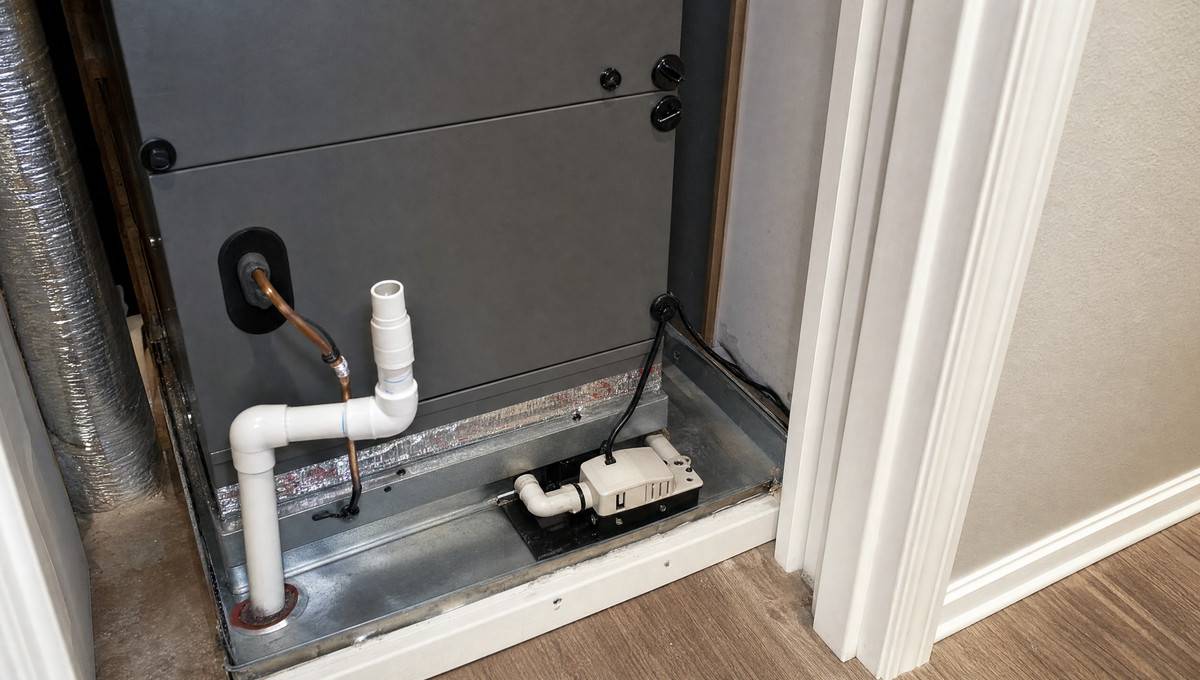 A condensate drain or float switch problem can interrupt low-voltage control power and make a thermostat appear dead.
10 Reasons Your Thermostat Screen Went Blank
Once the safe triage is done, use the deeper causes below to interpret what you found. Some are easy homeowner fixes. Others are clues that the system needs a trained technician with a meter, wiring knowledge, and access to the indoor unit’s control compartment.
| Cause | Why It Blanks the Thermostat | Homeowner-Safe Action | Technician Threshold |
| Dead batteries | The display has no local power. | Install fresh batteries and clean contacts. | Screen remains blank with confirmed fresh batteries. |
| Tripped breaker or off service switch | The indoor unit cannot supply control power. | Reset once and verify the nearby switch is on. | Breaker trips again or the unit stays dead. |
| Loose access panel | Door switch may interrupt operation. | Reseat the panel without touching wires. | Panel, switch, or wiring appears damaged. |
| Float switch or clogged drain | Safety switch may cut the 24V circuit. | Look for water and avoid bypassing the switch. | Drain backup, overflowing pan, or recurring water. |
| Low-voltage fuse | A short can open the protective fuse on the board. | Do not replace fuses repeatedly. | Fuse is blown or fails again after replacement. |
| Transformer or control board problem | The system cannot create or distribute control power. | Stop after visual and breaker checks. | No low-voltage power, no board lights, or suspected failure. |
| Thermostat wiring fault | Loose, broken, pinched, or chewed wires can interrupt power. | Do not move wires unless power is off and you are following instructions. | Any damaged wire, short, or unknown terminal connection. |
| Missing C-wire | Some smart thermostats require steady common-wire power. | Check compatibility instructions. | No C-wire solution is clear, or wiring differs from the manual. |
| Failed thermostat | The wall device cannot use available power. | Try reset steps from the manual if safe. | Confirmed power is present but the thermostat will not function. |
| Dim screen or sleep mode | The display may be off while the thermostat is still alive. | Tap the screen, adjust brightness, and check the app if applicable. | Screen never wakes and equipment does not respond. |
1. Dead batteries or poor battery contact
The simplest answer is still common. Weak batteries can make a screen fade, flicker, or disappear. Corroded contacts can do the same even when the batteries are new. If you see white or green residue, remove the batteries and clean the compartment carefully according to the manufacturer’s guidance. Do not use leaking batteries again.
2. Tripped HVAC breaker or switched-off indoor unit
For a hardwired thermostat, power usually begins at the indoor HVAC equipment. If the breaker is off, the furnace or air handler cannot feed low-voltage power to the thermostat. A nearby service switch can create the same symptom. This is why a thermostat may go blank after someone has been working in the utility room.
Reset a breaker once. Maintaining these electrical connections is a key part of long-term system reliability. When wiring becomes brittle or terminals loosen due to vibration, the steady flow of power required for modern digital displays can be interrupted. If you suspect that your setup is no longer receiving the correct voltage from the indoor unit, looking for expert furnace repair near me can help you understand how local specialists identify complex electrical faults. Addressing these small connection issues early may help you avoid a total loss of climate control during peak summer or winter months. Consistent professional inspections support every part of the low-voltage circuit remaining secure and functional.
3. Loose furnace or air-handler access panel
If the blank screen appeared soon after a filter change, look at the indoor unit panel. A small gap can keep the door switch open. Homeowners often miss this because the panel looks “almost closed.” In HVAC controls, almost closed may still be open.
4. Condensate float switch or clogged drain line
This is one of the most overlooked reasons for a blank thermostat during cooling season. Your air conditioner produces condensate as it removes humidity. ENERGY STAR recommends checking filters monthly during heavy-use months and tuning up HVAC equipment yearly, partly because airflow, dirt, and maintenance problems can raise stress on the system.[3] Drain maintenance is part of that bigger comfort-and-reliability picture.
If the condensate line clogs, water may collect in a pan or switch assembly. A float switch can open the low-voltage circuit so the system stops before water damages ceilings, floors, or walls. To the homeowner, it can look as if the thermostat died overnight.
“Holy shit. It was the float switch. (Edited to add: not OP. Just a new homeowner trying to figure out if it was the thermostat or something else.)”
Homeowner follow-up from r/hvacadvice.
5. Low-voltage fuse on the control board
Many indoor units protect the low-voltage control circuit with a small fuse on the control board. When that fuse opens, the thermostat may lose power. The important point is that a blown fuse is often a symptom, not the root cause. A shorted thermostat wire, contactor problem, miswired thermostat, or damaged component may have caused it.
If a technician replaces the fuse and it blows again, the next step is diagnosis, not a larger fuse and not repeated guessing. Never increase fuse size to keep the system running.
6. Transformer or control board power problem
The transformer is the part that helps create the low-voltage control power used by many thermostats and HVAC controls. If it fails, or if the control board stops distributing power correctly, the thermostat may stay blank while the rest of the house has normal electricity. This is a technician-level diagnosis for most homeowners because it requires safe electrical testing inside the equipment.
7. Loose, broken, or chewed thermostat wiring
Thermostat wires are small. They can break at the wall plate, pull loose at a terminal, get pinched during installation, or be damaged by rodents in an attic, crawlspace, or wall cavity. A single loose R or C connection can make a hardwired thermostat go dark.
Maintaining these electrical connections is a key part of long-term system reliability. When wiring becomes brittle or terminals loosen due to vibration, the steady flow of power required for modern digital displays can be interrupted. If you suspect that your setup is no longer receiving the correct voltage from the indoor unit, you may need a Furnace repair service in Clifton Park to understand how local specialists identify complex electrical faults. Addressing these small connection issues early can help you avoid a total loss of climate control during peak summer or winter months. Consistent inspections ensure that every part of the low-voltage circuit remains secure and functional.
Maintaining these electrical connections is a key part of long-term system reliability.
Small wiring faults can occasionally lead to broader complications that might suggest the need for a full ac installation if the existing system is aged or frequently failing. While minor terminal issues are often repairable, consistent electrical instability sometimes indicates that the internal components are nearing the end of their functional lifespan. Evaluating the overall health of your unit during these troubleshooting steps helps determine whether a simple repair will suffice or if transitioning to a more modern, energy-efficient system is a better long-term choice for maintaining indoor comfort. Regular inspections can identify these patterns before they result in a complete loss of cooling.
When wiring becomes brittle or terminals loosen due to vibration, the steady flow of power required for modern digital displays can be interrupted. If you suspect that your setup is no longer receiving the correct voltage from the indoor unit, you can view it now to understand how local specialists identify complex electrical faults. Addressing these small connection issues early can help you avoid a total loss of climate control during peak summer or winter months. Consistent professional inspections ensure that every part of the low-voltage circuit remains secure and functional.
If you recently installed a thermostat and the screen is blank, turn off power before touching the baseplate. Take clear photos before moving any wire. If the wire colors do not match the labels, follow the terminal labels and equipment manual rather than guessing based on color alone.
8. Missing or disconnected C-wire on a hardwired or smart thermostat
Many smart thermostats need stable power. A common wire, often called the C-wire, gives a return path for continuous thermostat power. Resideo describes its C-wire adapter as a way to power connected Honeywell Home thermostats that require a common wire.[2] If your smart thermostat worked for a while and then went blank, the cause may still be broader than the C-wire. Check the HVAC power path first.
9. Failed thermostat
Thermostats can fail. Screens can die, internal relays can stop responding, and electronics can be damaged by age, incorrect wiring, or surges. Still, the thermostat is not the first part to blame when a hardwired screen goes blank. A new thermostat placed on a dead control circuit will often be blank too.
“You need 24v AC between R and C. If you do have 24v right there at the thermostat, it’s a bad thermostat. No 24v could have blown low voltage fuse, blown transformer in indoor unit, no/improper power to indoor unit.”
Diagnostic comment from r/hvacadvice.
For most readers, the takeaway is not to grab a meter and start probing. The takeaway is that thermostat replacement makes sense only after the power source is understood.
10. Locked screen, sleep mode, dim display, or internal reset
Not every dark-looking screen is a power failure. Some smart thermostats dim when inactive, lose Wi-Fi but still control equipment, or need a manual wake gesture. Tap the display, check the app, and look for status lights or icons. If the HVAC responds normally, you may be dealing with brightness, settings, or a display issue rather than a no-power failure.
Why Batteries May Turn the Screen On but Not Fix the HVAC
This issue deserves its own section because it catches careful homeowners. You replace the batteries, the thermostat screen returns, and for a few seconds everything feels solved. Then the indoor blower never starts, the outdoor unit stays quiet, or the furnace does nothing.
In that situation, the batteries may be powering only the thermostat display. The thermostat still needs a working control path to command heating or cooling. If the HVAC equipment has no power, a safety switch is open, the low-voltage fuse is blown, or the transformer is not supplying control voltage, the display can look alive while the equipment remains silent.
The practical test is simple and safe: after the screen turns on, change the setpoint enough to call for heating or cooling and listen for a normal response. If nothing happens, return to the HVAC power path rather than replacing the thermostat again.
What Not to Do When the Thermostat Is Blank
A blank thermostat is frustrating because it removes your main way to control comfort. That frustration can lead to risky shortcuts. Avoid these common mistakes.
- Do not bypass a float switch. It may be preventing water damage.
- Do not repeatedly reset a tripping breaker. A repeated trip is a fault signal.
- Do not randomly move thermostat wires. A wrong connection can blow a fuse or damage equipment.
- Do not keep replacing low-voltage fuses. Find the cause of the short.
- Do not assume a new thermostat solves a no-power problem. Confirm the power path first.
- Do not perform high-voltage testing without training. Call a licensed HVAC professional for equipment-panel electrical diagnosis.
“I woke up this morning with a blank screen on my thermostat. The device does not take batteries, I have flipped breakers, changed the air filter… I have been troubleshooting and hear about a flood filter? Clogged drain? How do I check these things?”
Homeowner troubleshooting post from r/hvacadvice.
That post captures the real problem: once batteries and breakers do not explain the blank screen, the next likely causes are often inside the HVAC system. That is where clear boundaries matter.
When to Call an HVAC Technician
Call a qualified HVAC technician when the safe checks do not restore the screen or when the symptoms point to electrical, control-board, wiring, or water-safety problems. This is especially important during extreme heat or cold, when the lack of heating or cooling can become a health concern.
Stop troubleshooting and schedule service if the breaker trips again, water is present near the indoor unit, the thermostat is hardwired and remains blank after the breaker, service switch, and access panel are checked, a new thermostat is also blank, you see damaged low-voltage wires, there is a burning smell, the low-voltage fuse blows more than once, or the system is under warranty and you risk voiding coverage by opening panels.
What to Tell the Technician Before the Visit
A good service call starts with a clear history. The more specific you can be, the faster the technician can choose the right diagnostic path.
| Information to Share | Why It Helps |
| Thermostat brand and model, if visible. | Helps the technician check power requirements and known setup steps. |
| Whether the thermostat has batteries. | Separates display-power issues from hardwired control-power issues. |
| When the screen went blank. | Connects the failure to storms, filter changes, cooling cycles, or installation work. |
| Whether AC, heat, blower, or outdoor unit stopped too. | Shows whether the problem is isolated to the thermostat or affects the system. |
| Breaker reset result. | A repeated trip changes the urgency and diagnostic direction. |
| Any water near the indoor unit, drain pan, or condensate pump. | Points toward float switch or clogged drain issues. |
| Recent thermostat replacement or wiring changes. | Raises the chance of C-wire, terminal, compatibility, or setup problems. |
| Photos of the thermostat wiring before changes. | Prevents confusion if the wall plate was removed. |
How to Prevent a Blank Thermostat From Happening Again
Some failures are random, but many blank-thermostat calls are tied to maintenance, water, power, or installation details. ENERGY STAR recommends checking HVAC filters monthly during heavy-use seasons, changing them at least every three months, and tuning up HVAC equipment yearly.[3] Those habits do not guarantee a thermostat will never go blank, but they reduce the conditions that lead to airflow stress, dirt buildup, drain trouble, and preventable service calls.
Replace thermostat batteries on a schedule if your model uses them. Keep the condensate drain and pump on your seasonal maintenance list. After changing filters, make sure the access panel seats fully. If you install a smart thermostat, confirm system compatibility and power requirements before removing the old one. ENERGY STAR notes that smart thermostats vary by product and that homeowners should choose one compatible with the heating and cooling system.[1]
The bigger preventive idea is simple: do not ignore the first warning sign. A thermostat that flickers, randomly reboots, loses Wi-Fi repeatedly, or goes blank only during cooling cycles may be telling you about a power or drain issue before it becomes a no-comfort emergency.
FAQ About a Blank Thermostat
Why is my thermostat blank but the breaker is not tripped?
The breaker is only one part of the path. The thermostat may still be blank because of dead batteries, an off service switch, a loose furnace or air-handler panel, a condensate float switch, a low-voltage fuse, transformer failure, wiring damage, a missing common wire, or a failed thermostat.
Can a clogged drain make my thermostat go blank?
Yes, if your system has a float switch wired to interrupt low-voltage control power. A clogged condensate drain can raise water in the pan or switch body. The safety switch may then shut the system down, and the thermostat can appear dead.
Why did my thermostat turn on with batteries but the AC still will not run?
The batteries may be powering the screen only. The air conditioner still needs the indoor unit, transformer, control board, wiring, and safety switches to provide a working control path. If the display is awake but the equipment is silent, look upstream from the thermostat.
Should I replace the thermostat first?
Usually no. Replace batteries first if the model uses them, then check safe power and panel issues. Replacing the thermostat makes sense when power is available at the thermostat and the device still will not work, or when a technician confirms the thermostat has failed.
Is a blank thermostat an emergency?
It depends on conditions in the home. It is more urgent during extreme heat or cold, when infants, older adults, people with health conditions, or pets are at risk. It is also urgent if you see water overflow, smell burning, hear electrical buzzing, or have a breaker that keeps tripping.
How much does it cost to fix a blank thermostat?
The cost depends on the cause. Fresh batteries are inexpensive. A drain-clearing visit, thermostat replacement, low-voltage fuse diagnosis, transformer replacement, wiring repair, or control-board repair can vary widely by region, equipment type, and service company. Ask for the diagnostic fee and repair options before approving work.
Why is my Honeywell thermostat blank?
A Honeywell or Honeywell Home thermostat can go blank for the same broad reasons as other thermostats: batteries, hardwired power loss, C-wire issues, HVAC equipment power loss, safety switches, wiring, or device failure. Check the exact model manual because battery and reset steps differ by model.
Why is my Nest or other smart thermostat blank?
A smart thermostat may be blank because of a drained internal battery, missing or unstable C-wire power, HVAC equipment power loss, Wi-Fi or software issues, wiring problems, or a safety switch opening the control circuit. Start with the app and manufacturer guidance, but do not ignore the HVAC equipment power path.
Bottom Line
If you are asking, “Why is my thermostat blank?” start with power, not replacement. For battery models, install fresh batteries and confirm the contacts are clean. For hardwired models, think upstream: breaker, service switch, access-panel door switch, condensate float switch, low-voltage fuse, transformer, wiring, and only then the thermostat itself.
The safest homeowner strategy is to do the simple checks in order, avoid bypassing safety devices, reset a breaker only once, and call an HVAC technician when the issue moves into water overflow, repeated trips, fuses, transformers, wiring, or control-board diagnosis. That approach protects both your comfort and your equipment.
Maintaining your climate control system involves more than just clearing physical debris from the utility room. Electrical stability is equally important for keeping your home comfortable throughout the year. When a display fails or a system refuses to start, it often points to a break in the low-voltage control circuit. For homeowners who need help navigating these electrical or mechanical faults, you can click for service to connect with technicians who specialize in diagnostic testing. Staying proactive with these technical checks helps prevent sudden outages and ensures your heating equipment remains safe and reliable during the coldest months.
References
- ENERGY STAR: Smart Thermostats. Accessed May 22, 2026.
- Resideo / Honeywell Home: C-Wire Power Adapter Product Information. Accessed May 22, 2026.
- ENERGY STAR: Heat & Cool Efficiently. Accessed May 22, 2026.
- Reddit r/hvacadvice: Blank screen on thermostat. Accessed May 22, 2026.
- Reddit r/hvacadvice: 24V diagnostic comment. Accessed May 22, 2026.
- Reddit r/HVAC: Thermostat blank and AC won’t turn on. Accessed May 22, 2026.
- Reddit r/hvacadvice: Float switch homeowner follow-up. Accessed May 22, 2026.
Last modified: July 6, 2026